
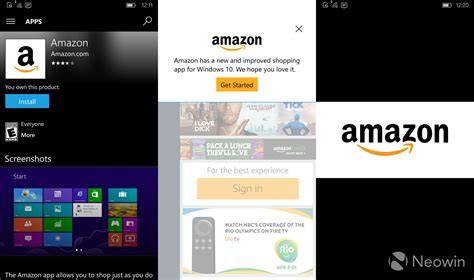
Is There an Amazon App for Windows 10
Yes, there is there an amazon app for windows 10 in some cases, but it depends on which Amazon service you mean. Amazon does not have one single all-purpose Windows 10 app for everything. On Windows 10, you can usually use Amazon through a web browser, and some Amazon-related apps or services, such as Prime Video or Kindle, may be available depending on your region and device.
What people usually mean by an Amazon app on Windows 10

When someone asks whether there is an Amazon app for Windows 10, they are often looking for one of these things:
- Amazon Shopping for browsing and buying products
- Prime Video for watching movies and TV shows
- Kindle for reading ebooks on a PC
- Amazon Assistant or another browser-based Amazon tool
These are not the same thing, and availability can differ. That is why the answer is not a simple yes or no for every Amazon service.
Which Amazon apps work on Windows 10?
The availability of Amazon apps on Windows 10 varies by product and by region. Here is a simple way to think about it:
| Amazon service | Windows 10 availability | Best option if you cannot find an app |
|---|---|---|
| Amazon Shopping | Usually browser-based rather than a dedicated desktop app | Use Amazon.com in Microsoft Edge, Chrome, or another browser |
| Prime Video | May be available through the Microsoft Store or other official channels in some regions | Use the web version if the app is unavailable |
| Kindle | Kindle for PC is available for many Windows users | Download the desktop Kindle app from Amazon or use Kindle Cloud Reader |
| Amazon Assistant | Availability has changed over time and may not be offered everywhere | Use the Amazon website directly |
If your goal is shopping, the browser is usually the easiest and most reliable way to use Amazon on Windows 10.
How to check for an official Amazon app in the Microsoft Store

If you want to see whether an Amazon app is available for your Windows 10 PC, the Microsoft Store is the first place to check. Follow these steps:
- Open the Microsoft Store on your Windows 10 computer.
- Search for the exact Amazon service you want, such as Amazon Prime Video or Kindle.
- Check the publisher name carefully. Official apps should show Amazon as the publisher or another clearly official source.
- Review the app description to confirm it matches what you need.
- Install only if it looks official and relevant to your use case.
If you do not see the app you expected, that does not always mean something is wrong with your PC. It may simply mean the app is not offered in your region, is no longer supported, or is only available for certain devices.
How to use Amazon on Windows 10 without an app

If there is no dedicated Amazon app for your needs, the website is usually the best alternative. You can do almost everything from a browser:
- Shop for products
- Track orders
- Manage payment methods
- View your account
- Download digital content where available
- Access Prime Video through the web
To use Amazon in Windows 10, open your browser and go to Amazon’s official website. Sign in with your Amazon account, then use the site just as you would on a phone or tablet. For most shoppers, this is the simplest solution.
Why the browser option is often better
The browser version has a few practical advantages:
- No installation is required
- You always get the latest site version automatically
- It works on almost any Windows 10 device
- It avoids confusion about whether an app is official
Why the Amazon app may not show up in Windows 10

If you search the Microsoft Store and cannot find the Amazon app you expected, several things could be causing that:
- Region restrictions, some apps are only available in certain countries
- Windows version issues, older or unsupported builds may not qualify
- Device compatibility, some apps are designed for specific hardware or screen types
- App availability changes, developers sometimes remove or replace apps
- Microsoft Store problems, the store itself may need an update or repair
If the app is missing, try signing out and back into the Microsoft Store, checking your Windows Update status, and searching the official Amazon website for current app options.
How to spot an official Amazon app
Because app stores can include similar-looking third-party apps, it is worth checking carefully before installing anything.
- Look at the publisher, official Amazon apps should clearly identify Amazon or an official Amazon entity
- Read the description, it should match the Amazon service you need
- Check the ratings and reviews, but do not rely on them alone
- Avoid apps with vague branding that only mention Amazon in the title
- Use Amazon’s official website if you are unsure
This matters most for shopping and account access, since you do not want to enter login details into an app that is not clearly official.
Best options for different Amazon tasks on Windows 10
Here is the easiest way to choose the right option based on what you want to do:
For shopping
Use the Amazon website in your browser. It is usually the most reliable choice for browsing products, placing orders, and checking deliveries.
For watching Prime Video
Check whether Prime Video is available in the Microsoft Store for your region. If not, use the web version in a browser.
For reading Kindle books
Look for Kindle for PC or another official Kindle option. If you only need to read in a browser, check whether Kindle Cloud Reader works for your account and content.
For general Amazon account access
Use the website. It is the most universal answer to the question of how to use Amazon on Windows 10.
Troubleshooting if Amazon will not install or open
If you found an official app but it will not install or start, these basic checks often help:
- Update Windows 10 so your system has the latest compatibility fixes.
- Restart your PC to clear temporary app or store issues.
- Sign out of the Microsoft Store and sign back in.
- Check your internet connection, since store downloads need a stable connection.
- Make sure there is enough storage space for the installation.
- Confirm the app is supported in your region.
If none of that works, the browser version is usually the fastest fallback.
When the browser is the right answer
For many Windows 10 users, the browser is not a compromise, it is the best choice. Use the browser if you want to:
- Shop on Amazon without installing anything
- Access your account from any Windows 10 PC
- Avoid app compatibility problems
- Keep things simple and official
If your only goal is to buy items or manage your account, there is often no need to hunt for a separate app at all.
Frequently Asked Questions About is there an amazon app for windows 10
Is there an Amazon app for Windows 10?
There may be official Amazon apps for specific services like Prime Video or Kindle, but Amazon shopping is usually best accessed through a web browser on Windows 10.
Can I download Amazon from the Microsoft Store?
You may find some official Amazon-related apps in the Microsoft Store, but availability depends on the service, your region, and your device.
What is the official Amazon app for PC?
There is not one single official Amazon PC app for everything. The right app depends on what you want to do, such as shopping, watching videos, or reading books.
How do I use Amazon on Windows 10 without an app?
Open Amazon in a browser like Microsoft Edge or Chrome, then sign in and use the website for shopping, account management, and other supported features.
Why is the Amazon app not showing in Windows 10?
It may not be available in your region, your Windows version may not be compatible, or the app may no longer be offered in the Microsoft Store.
Is it safe to use Amazon in a browser on Windows 10?
Yes, as long as you use Amazon’s official website and sign in through a secure browser connection.
Conclusion
If you are asking, is there an amazon app for windows 10, the practical answer is that it depends on the Amazon service you want. For shopping, the Amazon website is usually the best solution on Windows 10. For other Amazon services like Prime Video or Kindle, an official app may be available in some cases, but not always. If you cannot find an app, using Amazon in a browser is safe, simple, and works on most Windows 10 PCs.
